New article
Recently updated
Using the Canada Auditor Changes database

Who is this article for?
Users who want to learn about the Canada Auditor Changes database.
No special access or permissions are required.
The Audit Analytics Canada Auditor Changes database covers all SEDAR registrants who have disclosed an auditor change in electronic filings.
1. Understanding common uses
The Canada Auditor Changes database helps you:
- Track auditor changes with related issues including lack of independence, accounting issues, illegal acts, and scope limitations
- Monitor auditor market share
- Access key data points including departing and engaged auditors and date of announcement
- Filter by standard income and industry criteria, with additional flags for auditor changes related to going concerns and company issues
- Discover how shifts in the regulatory and market environments impact auditor changes
2. Accessing the database
The Canada Auditor Changes database is available through:
- Online access
- WRDS (Wharton Research Data Services)
- Data feeds [Feed54] with the relevant subscription
Note: Saved Search Alert functionality is available, but Daily Summary Email is not supported.
3. Understanding collection methodology
The database uses the following collection methods:
- Currencies are converted from the reporting currency using the exchange rate as of the corresponding event date (Market Cap Rate, Revenue Date, Assets Date, or fiscal year end, as applicable)
- Data is extracted by filtering SEDAR filings by document type, then manually pulling relevant auditor change information from the filings
- When registrants do not disclose auditor changes in specific document types, further investigation examines other filings (such as those reviewed for Audit Fee data)
- Data is sourced from Notice, Letter from Successor Auditor, Letter from Predecessor Auditor, News Release, and Management Information Circular form types
Important: In August 2024, the following fields were modified due to a change in source data: Industry Key and Industry Description were deprecated, and Business Phone, Business Fax, and Contact Fax were replaced by two new fields (Phone and Fax).
4. Searching the database
The Auditor Changes search page offers multiple filters to refine your search results.
Searching
- The Auditor Changes search page offers the following filters:
| Name | Description | Data Dictionary Field(s) | Sort By? |
| Departed Auditor | Filter by the departing auditor | Departed Auditor Name Departed Auditor Key | Yes |
| Engaged Auditor | Filter by the engaged auditor | Engaged Auditor Name Engaged Auditor Key | Yes |
| Search by Ticker or Issuer Number | Filter for companies | Issuer Number CIK Code Ticker | Yes |
| Going Concern | Indicates whether changes include a going concern or not | Going Concern Flag | No |
| Issues | Indicates whether there were issues cited in auditor change disclosure or not | Issues Flag | No |
| Market Index | Filter by SEDAR Market Indices | Current TSX Issuer Current TSXV Issuer | No |
| Exit Type | Filter by whether exiting auditor resigned or was dismissed | Dismissed / Resigned | No |
| Currency | Filter by representing currency *Defaults to CAD but offers optons for CAD and USD | N/A | No |
| Market Cap (CAD) | Filter by a range of companies’ market caps | CAD Market Cap USD Market Cap | Yes |
| Revenue (CAD) | Filter by a range of companies’ revenue | CAD Total Revenue (MRFY) USD Total Revenue (MRFY) | Yes |
| Assets (CAD) | Filter by a range of companies’ total assets as of asset date | CAD Total Assets USD Total Assets | Yes |
| Filter by Industry | Filter by companies’ industry(s) | NAICS Code NAICS Description | No |
| Company Location | Filter by current business address location(s) | Bus City Bus State Bus Country Bus Code | No |
| Filing Date | Filter by a range of dates on which source filing was submitted to SEDAR | Filing Date | Yes |
| Departed Date | Filter by range of auditor departing date | Departed Effective Date Departed Date | Yes |
| Engaged Date | Filter by range of auditor engaged date | Engaged Effective Date Engaged Date | Yes |
5. Viewing and exporting results
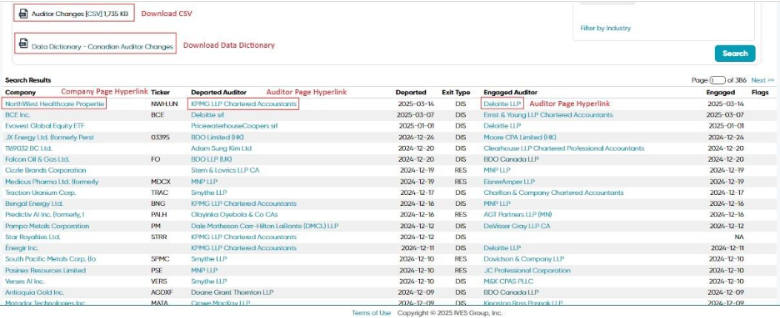
Results appear at the bottom of the page. You can access the following through hyperlinks:
- CSV file downloads of the results
- Canada Auditor Changes Data Dictionary download (all fields available in the CSV are defined here)
- Overview of individual companies' profile
- Departed auditor profile
- Engaged auditor profile