New article
Recently updated
Using the Registered Investment Advisers database

Who is this article for?
Users who want to learn about the Registered Investment Advisers database.
No special access or permissions are required.
The Audit Analytics Registered Investment Advisers database provides comprehensive data on investment advisers who have filed SEC Form ADV electronically, enabling you to analyse auditor relationships, assets under management, and regulatory compliance.
1. Understanding the database coverage
The Registered Investment Advisers database covers investment advisers who have filed SEC Form ADV electronically. The module comprises current data extracted from the most recent Form ADV filed.
Registered investment advisers who have more than $110M in assets under management (AUM) are generally required to register with the SEC and file Form ADV. Form ADV contains information about an adviser's business, ownership, clients, employees, business practices, affiliations, and any disciplinary event.
2. Identifying common uses
The database supports various analytical and profiling activities:
- Know who audits registered investment advisers and private funds
- Analyse top-ranking auditors by AUM or number of clients
- Identify the private funds, investment companies, and business development companies advised by the RIA
- Know which RIAs were audited by surprise exam
- Profiling metrics include AUM, number of clients, number of accounts, and number of employees
- Relationships include direct owners, indirect owners and control persons, private funds under management, and financial affiliations
- Regulatory requirements include the surprise exam or pooled audit requirement
3. Accessing the database
The Registered Investment Advisers database is available through multiple channels:
- Online access
- Through WRDS
- As data feeds (Feed35 – RIA and Feed36 – RIA Current Engagements) with the relevant subscription
Note: Saved Search Alert and Daily Summary Email features are not available for this database.
4. Understanding data collection
This data is sourced from SEC Form ADV filings.
5. Searching the database
The RIA search page offers four unique search methods:
- RIA – Current [Adviser Search]
| Name | Description | Data Dictionary Field(s) | Sort By? |
|---|---|---|---|
Search:
| Filter results to a specific population | Filing Adviser CRD(s) Relying Adviser CRD | Yes |
| Disclosed Auditor? | Filter by whether auditor was disclosed or not | Filing Adviser SEC Number | No |
| SEC Adviser? | Filter by whether adviser is SEC registered or not | Filing Adviser CIK(s) Relying Adviser CIK(s) | No |
| Assets Under Management | Filter by range of assets under management | N/A | Yes |
| Signature Date | Filter by range of signature dates | N/A | Yes |
| Company Location | Filter by current business address location(s) | Bus City Bus State Bus State Name Bus Region Bus Country Name Bus Country | Yes |
- RIA – Current [Auditor Search]
| Name | Description | Data Dictionary Field(s) | Sort By? |
|---|---|---|---|
| Filter by Auditor | Filter for a specific auditor or group of auditors | Filing Adviser CIK(s) Relying Adviser CIK(s) | Yes |
| SEC Adviser? | Filter by whether adviser is SEC registered or not | Filing Adviser CIK(s) Relying Adviser CIK(s) | Yes |
| Assets Under Management | Filter by range of assets under management | N/A | Yes |
| Signature Date | Filter by range of signature dates | N/A | Yes |
| Company Location | Filter by current business address location(s) | Bus City Bus State Bus State Name Bus Region Bus Country Name Bus Country | Yes |
| Auditor Location | Filter by auditor location | N/A | Yes |
- RIA – Historical [Adviser Search]
| Name | Description | Data Dictionary Field(s) | Sort By? |
|---|---|---|---|
Search:
| Filter results to a specific population | Filing Adviser CRD(s) Relying Adviser CRD | Yes |
| Disclosed Auditor? | Filter by whether auditor was disclosed or not | Filing Adviser SEC Number | No |
| SEC Adviser? | Filter by whether adviser is SEC registered or not | Filing Adviser CIK(s) Relying Adviser CIK(s) | No |
| Assets Under Management | Filter by range of assets under management | N/A | Yes |
| Signature Date | Filter by range of signature dates | N/A | Yes |
| Adviser Location | Filter by adviser location | City State Zip Code Country | Yes |
- RIA – Historical [Auditor Search]
| Name | Description | Data Dictionary Field(s) | Sort By? |
|---|---|---|---|
| Filter by Auditor | Filter for a specific auditor or group of auditors | Filing Adviser CIK(s) Relying Adviser CIK(s) | Yes |
| SEC Adviser? | Filter by whether adviser is SEC registered or not | Filing Adviser CIK(s) Relying Adviser CIK(s) | Yes |
| Assets Under Management | Filter by range of assets under management | N/A | Yes |
| Signature Date | Filter by range of signature dates | N/A | Yes |
| Adviser Location | Filter by adviser location | City State Zip Code Country | Yes |
| Auditor Location | Filter by auditor location | N/A | Yes |
Each search method provides specific filters tailored to the search type.
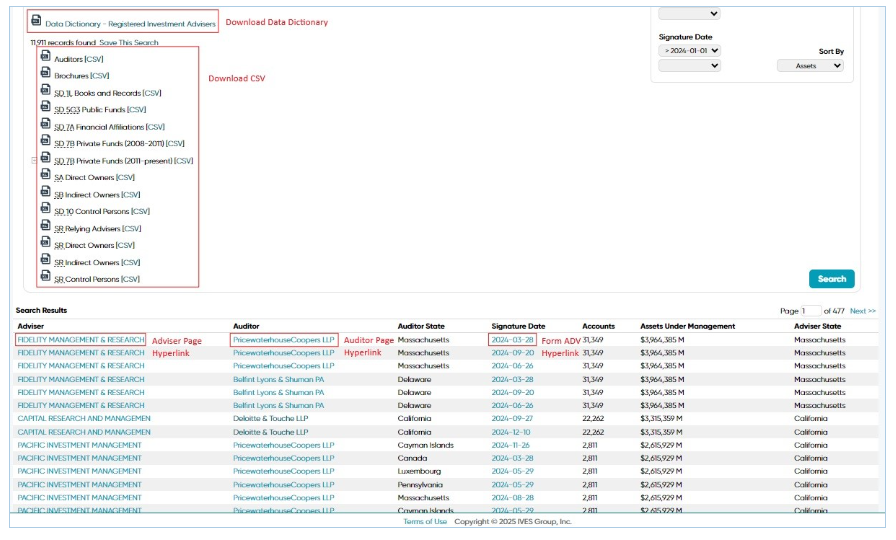
6. Viewing results for current adviser searches
To access your search results, follow these steps:
- View results at the bottom of the page.
- Click the relevant hyperlinks to access additional resources.
The following resources are available through hyperlinks:
- Registered Investment Advisers Data Dictionary download
- CSV file downloads of the results
- Auditor profiles
- Form ADV PDF
All fields available in the CSV are defined in the Data Dictionary.
7. Viewing results for current auditor searches
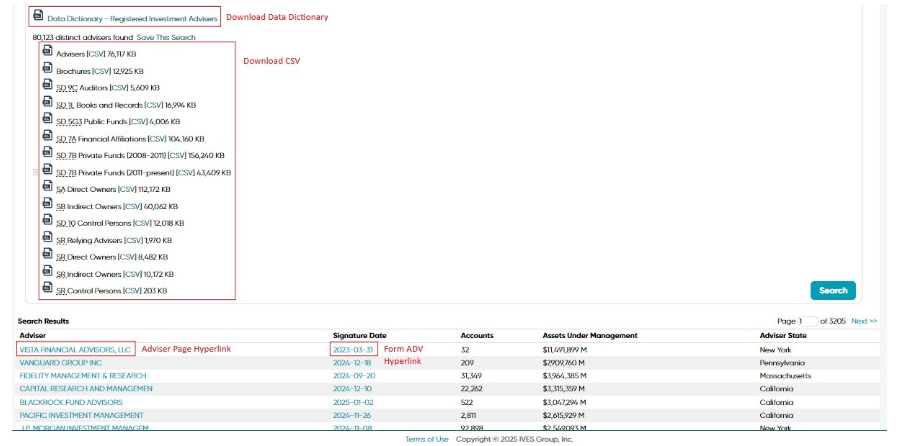
To access your search results, follow these steps:
- View results at the bottom of the page.
- Click the relevant hyperlinks to access additional resources.
The following resources are available through hyperlinks:
- Registered Investment Advisers Data Dictionary download
- CSV file downloads of the results
- Overview of individual advisers' profile
- Auditor profiles
- Form ADV PDF
All fields available in the CSV are defined in the Data Dictionary.
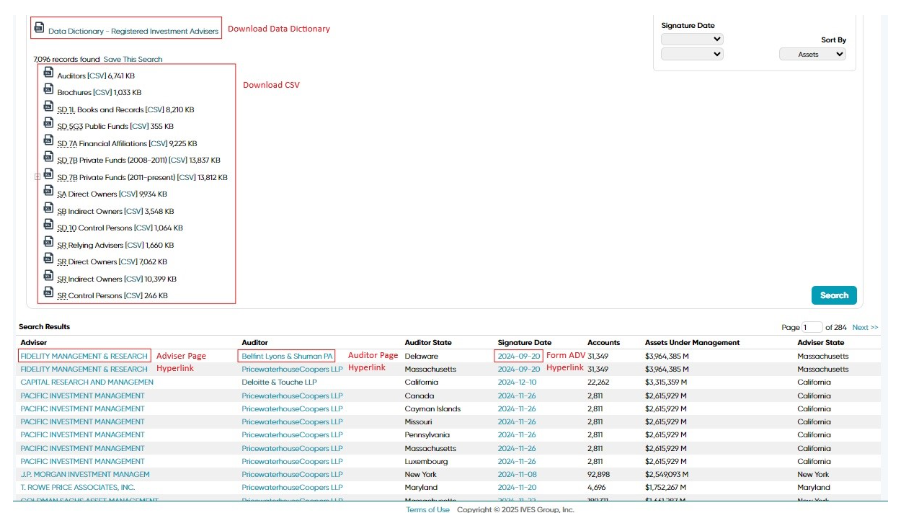
8. Viewing results for historical adviser searches
To access your search results, follow these steps:
- View results at the bottom of the page.
- Click the relevant hyperlinks to access additional resources.
The following resources are available through hyperlinks:
- Registered Investment Advisers Data Dictionary download
- CSV file downloads of the results
- Overview of individual advisers' profile
- Form ADV PDF
All fields available in the CSV are defined in the Data Dictionary.
[IMAGE_PLACEHOLDER_img_1773839096412_6oolhfl0l]
9. Viewing results for historical auditor searches
To access your search results, follow these steps:
- View results at the bottom of the page.
- Click the relevant hyperlinks to access additional resources.
The following resources are available through hyperlinks:
- Registered Investment Advisers Data Dictionary download
- CSV file downloads of the results
- Overview of individual advisers' profile
- Auditor profiles
- Form ADV PDF
All fields available in the CSV are defined in the Data Dictionary.